Edit Proposal Window
The Edit Proposal window is used to update the proposed deal for a customer or group of customers.

|
The Edit Proposal window can be accessed using one of the following methods:
|
 (Edit) icon.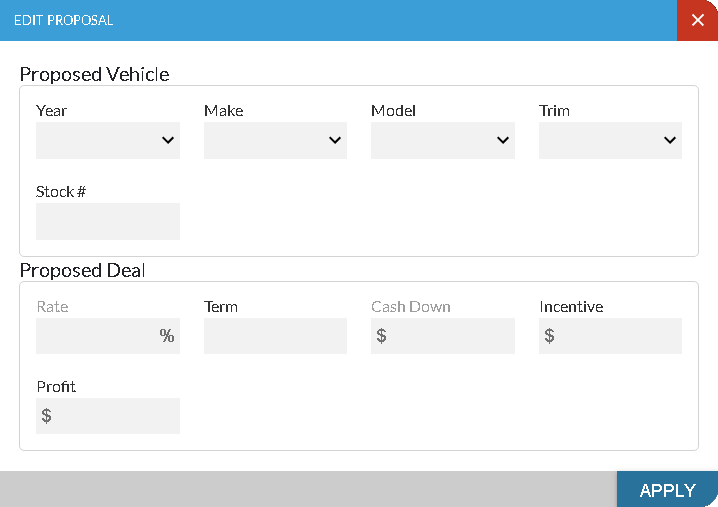
 Proposed Vehicle Section
The Proposed Vehicle section is used to edit information about the proposed vehicle to include on the currently selected deal. Entries in these fields are optional.
The following fields are available in the Proposed Vehicle section.
Year: Select the year for the proposed vehicle. Click the  (Down Arrow) icon to display a list of valid entries.
Make: Select the make for the proposed vehicle. Click the (Down Arrow) icon to display a list of valid entries.
Model: Select the model for the proposed vehicle. Click the (Down Arrow) icon to display a list of valid entries.
Trim: Select the trim level for the proposed vehicle. Click the (Down Arrow) icon to display a list of valid entries.
Stock #: Enter the stock number of the proposed vehicle.
Note - An entry in this field is required if entries are made in any other fields in this section.
Proposed Deal Section
The Proposed Deal section is used to edit information about the terms of the currently selected deal.
The following fields are available in the Proposed Deal section.
Rate: Enter the finance rate percentage for the proposed deal.
Note - The Rate field is not available for cash proposals. Additionally, the Rate field is not available unless the entry in the Term field is greater than 1.
Term: Enter the deal term, in months, for the proposed deal.
Cash Down: Enter the amount of money that the customer is using as a down payment for the proposed deal.
Incentive: Enter the incentive amount for the proposed deal.
Profit: Enter the additional amount to add to the price of the vehicle on the proposed deal.
Click here for a list of products that may be mentioned in this help file.